On this page
Onboarding
This path takes a new operator from no Stado state to an accepted canonical registry and then to normal fleet operation. If you already run Stado, first setup can adopt that existing registry instead of making you recreate hosts and fleets. Local mode needs no cloud account, provider CLI, or Wisent production credential.
Install an exact release
Set the immutable release identity, run the verified installer, and expose its binary directory:
export STADO_API_URL=<your-control-origin>
export STADO_RELEASE_VERSION=<exact-version>
export STADO_RELEASE_PLATFORM=<exact-platform>
./install-stado.sh
export PATH="$HOME/.stado/bin:$PATH"
Expected result: the installer prints installed Stado <version> for <platform> in <directory>. It rejects a manifest identity mismatch, missing artifact, digest mismatch, or checksum-list mismatch before replacing a binary.
Running stado without arguments opens the first-run path and records only its local journey progress. Import is optional; skipping it leaves an empty usable Stado setup.
Adopt an existing registry
Use the reusable CLI action directly, or select the same action from the first-run journey:
stado registry import /path/to/registry.json --json
# first-run equivalent
stado onboarding --import-registry /path/to/registry.json --json
The accepted input is a complete Stado registry-v2 JSON document — the same exact schema stado registry validate and the canonical store use, not a guessed CSV or generic inventory format. Stado validates the whole source and its fleet-to-target references before it opens the destination. It then additively merges named targets, fleets, coordinators, and placement_profiles, recursively adds destination-missing object fields, and preserves every declaration already in canonical storage. The source file is read-only and is not copied into application storage.
A byte-for-byte or semantically identical repeat reports the source declarations as unchanged. A name already present with different content, or any differing scalar or array without a domain identity, returns conflict, exits 75, and performs no write. Invalid JSON, an unsupported schema, an invalid target, or an invalid fleet relationship returns rejected, exits 1, and performs no write. Storage failures also exit 1. --json emits stado.registry-import-receipt.v1: the accepted generation plus exact imported and unchanged host and fleet names, sections, conflicts, and rejections. It never prints registry credential contents.
An accepted import persists only the merged canonical registry generation and local onboarding evidence containing the source digest and accepted generation. It reads no host, starts no workload, installs nothing, and does not change live fleet state. The same importer remains available later in Stado Desktop Settings → Existing registry.
Create the minimum local configuration
stado config init
stado config validate
stado doctor --fix-hints
Expected results:
config initprints the path to the new$HOME/.stado/config.json;- the file selects only the local compute provider, local primary and backup storage, no remote deployment binding, and loopback dashboard binding;
config validateprintsconfig ok (<path>);doctor --fix-hintsreports actionable missing workload dependencies without requiring cloud credentials.
config init never overwrites an existing file. For a legacy config without a schema marker, use stado config migrate; it preserves the exact prior document as a timestamped sibling before adding the current schema. Production Wisent policy, verifier allowlists, and cloud credentials belong in explicit deployment profiles under deploy/, not in first-run config.
Start the control plane
stado local-control-plane
Expected result: the process starts the queue coordinator, local worker, and loopback API listener. Leave it running; do not expose it publicly without the documented deployment authorization boundary. The listener serves no page — inspect the fleet with stado overview or Stado Desktop.
Submit and inspect one job
From another terminal using the same config:
stado submit "printf 'hello from Stado\n'"
stado status <job-id>
stado results <job-id> ./stado-result
Expected result: status progresses from queued or running to completed. The downloaded command output contains hello from Stado; the result manifest records the artifact size and SHA-256. A failed job remains inspectable and may still publish logs and partial artifacts.
Onboard another machine
A machine enters this fleet by one of four methods. All four are first-class, each one is available both from the CLI and from Stado Desktop, and stado fleet methods prints them together with the registry's own verdict on each:
stado fleet methods
stado fleet methods --json
Choosing a method
| Method | The operator needs | The machine needs | Choose it when | It will not |
|---|---|---|---|---|
invite, offline fragment |
to mint the key, send a fragment down whatever channel already reaches the machine's owner, and wait for one address back; no access to the machine at all | a terminal its owner can paste into, and Remote Login on before you enroll — no HTTPS, no curl, no reachable control point |
the machine belongs to somebody else, or you have no way in — a laptop, a colleague's desktop, a box behind someone else's NAT — and it cannot reach this fleet's control point | announce itself: no request appears under fleet pending, because you close the invitation yourself with fleet enroll --ssh <address> --bootstrap, which still probes |
invite, one line |
to mint one code and send a single line; no access to the machine at all | to run that one line once, with outward HTTPS to a control point that actually answers /join.sh — either a published deployment or an entrance stado fleet ingress up stands up in one command, with no Cloudflare credential at all |
the control point is published and reachable from the machine itself; fleet invite proves that before printing the line, and falls back to the fragment when it cannot |
register anything by itself: a redeemed invite is a pending request until you approve it, and approval still probes the machine |
adopt |
an SSH session that already opens today — agent, your own key, or the machine's own password prompt | Remote Login (sshd) enabled and your account able to write ~/.ssh/authorized_keys |
you can already log in: your own box, a fresh cloud VM, a rented or colocated host | help with a machine you cannot log into; it needs a working session before it can install the key |
join |
only to answer the request | the Stado binary and credentials for the fleet's store already present | the machine already carries fleet credentials — a reimaged host, a rebuilt worker, a machine that was in the fleet before | bring in a stranger's machine: without store credentials there is nothing to announce with |
declare |
the machine's exact hostname and release platform, asserted by you | nothing at the moment of declaration | you are recording a machine you will verify later, or repairing a registry entry | prove anything — it performs no probe, so a wrong assertion stays wrong until something else reads the machine |
invite and adopt are the two paths that need no prior key on the machine and are therefore the normal answers. Of invite's two modes, the offline fragment is the one that needs nothing published on the network, and fleet invite selects it for you when the control point does not answer. join and declare are the paths for a machine that already has credentials, or for a registry write with no machine involved yet.
A method the registry's enrollment catalog denies is still listed, marked unavailable and named with the field that denies it — registry.enrollment.allow_invite, allow_adopt, allow_join or allow_enroll. declare has no gate. stado fleet catalog prints the same catalog in full; a registry with no enrollment section leaves every method allowed.
Which way the key travels
One property holds in all four methods, and it is the property to check when reading any of them: the fleet dials the machine, so the machine only ever receives a public key. The ed25519 pair is minted by stado fleet key generate <name> into the operator's Skarbiec as the stado-ssh-<name> item. The private half is stored there, never printed, never transmitted, and never written to the machine being added; no method asks the machine to generate a pair of its own, and no method sends a private key anywhere.
What lands in the machine's ~/.ssh/authorized_keys is exactly one public line, and it is the same line whichever method put it there — whether a person pasted it, whether adopt wrote it over a session the operator already had, or whether the machine fetched it from the dashboard with an invite token. Afterwards stado fleet key ls shows stored keys as metadata only and stado fleet key check <name> proves the channel actually opens.
invite
The operator mints the machine's channel key and never touches the machine. The method has two modes, and which one applies is not a preference: it is whether the machine being added can reach this fleet's control point.
stado fleet invite --name <target-name> # probe the control point, then pick the mode
stado fleet invite --name <target-name> --offline # do not probe: fragment only
--name is optional: without it the target is named invited-<first 8 hex of the invite id>, and a name that collides with an existing target or another open invite is a hard error asking for --name rather than a silent suffix. Both modes mint stado-ssh-<target-name> through the same fleet key generate path and print its fingerprint, both accept --expires <duration> and --uses N — a duration is an integer plus one of s, m, h, d, and a bare number is refused rather than guessed; the default is one use and 24 hours — and in both the private half stays in the operator's Skarbiec.
Before it prints anything, the command works out the control address and fetches /join.sh from it. Three sources are tried in order: STADO_ENROLLMENT_URL / enrollment.url if configured, then the entrance stado fleet ingress has published and verified (enrollments/ingress.json, used only while its address still answers), then STADO_API_URL / api.url. No control host is compiled into Stado, so an address nobody configured and nobody published is a reason to fall back, not a name to invent. If the address does not resolve, or refuses the connection, or answers /join.sh with anything other than 200, the one line is not printed at all: those three cases are reported apart — a missing DNS record, a missing listener or tunnel, and a release too old for the routes are three different repairs — and the command continues in offline mode. The control-point check is the exact list of verdicts.
fleet/invite-a-machine.sh is this method end to end from the operator's side, offline mode first.
The offline mode
The mode that works today, and the default for any machine that cannot reach the control point. It mints no token and needs no HTTP route at all: the carrier is the channel you are already using to talk to whoever holds the machine.
stado fleet invite --name <target-name> --offline prints a self-contained sh fragment between two markers. Pasted into a terminal on the machine by its owner, it creates ~/.ssh at mode 700 and ~/.ssh/authorized_keys at mode 600, appends the fleet's public line there idempotently — the line is inside the fragment, not fetched from anywhere — reports whether anything answers on port 22 and prints the exact System Settings › General › Sharing › Remote Login path, or its Linux equivalent, when nothing does, and ends by printing the user@address its owner sends back to you.
The fragment is not a secret, and it says so in its own output: the only key in it is a public one, so reading it gains nobody anything. That sentence is there for a reason. A fragment treated as a credential gets routed down whichever channel feels secret rather than the one that actually reaches the machine's owner, and then the invitation simply stalls.
The invite object lands in enrollments/invites/<id>.json with mode: "offline", status open, and no secret_sha256, because no secret exists. stado fleet invites reports it as open (offline, awaiting address) — the one state in this lifecycle that waits on a person rather than on a clock. When the address arrives, the operator closes it with ordinary probe-then-write enrollment:
stado fleet enroll <target-name> --ssh <user@address> --bootstrap
That is adopt's command without --install-key, and it works precisely because the key is already in place: enrollment reads hostname, uname -s and uname -m over the channel, writes the entry from what it read, installs the agent, and rolls the entry back if that install fails. The invitation is then spent. There is no fleet pending step, because nothing self-reported: an offline invitation produces no request to approve, and the operator's own enrollment is the registry write.
The one-line mode
Available only when the check above succeeded. The command then prints the token once — <id>.<secret>, a 16-hex id and 32 CSPRNG bytes in unpadded base64url — states that nothing can reprint it, names the minted channel key's fingerprint, and gives the single line to forward to whoever holds the machine:
curl -fsSL <control-point>/join.sh | sh -s -- <id>.<secret>
<control-point> is the address that just answered the check, never a name built into Stado. When it came from stado fleet ingress, the command says so and repeats what that means: the address is a temporary Cloudflare quick tunnel, the one-liner dies with the ingress, and a restarted ingress comes back under a different address, so an invitation handed out before a restart is dead. The store keeps only secret_sha256, in enrollments/invites/<id>.json alongside target_name, created_at, expires_at, uses_allowed, uses_spent, status, created_by and the mode that distinguishes the two kinds of invitation. stado fleet invites lists live invites with their status and spend, and stado fleet revoke-invite <id> closes one immediately. --json carries the same token in token next to the ready join_command — plus base_source and base_is_temporary, so a script can tell a durable origin from a tunnel — so redirecting that output to a file writes a live credential to disk; nothing can reprint the token if it is lost, and the answer to a lost token is a new invite plus revoke-invite.
On the machine, that one line fetches GET /join.sh, reads the fleet's public key from GET /api/fleet/invite/key, appends it to ~/.ssh/authorized_keys, and announces the machine through POST /api/fleet/join with the hostname, OS, architecture, the destination it worked out for itself, the fingerprint it installed, and whether its SSH channel was answering. Both API routes are authorized by the invite token alone and neither can write the registry; the script itself carries no secret, because the secret is the argument the user supplies, and it installs no software — the agent arrives with your approval. See the invite endpoints for the exact contract.
The machine is then a pending request, exactly like join, and the operator finishes it:
stado fleet pending
stado fleet approve <hostname>
stado registry beacon-age
stado fleet pending shows, for an invited request, the channel destination approval will probe, the invite id it came from, the fingerprint of the key the machine installed, and whether that machine's SSH channel was answering when it reported; --json emits the same. Approving a machine whose channel is not answering yet is the one wasted round trip this view prevents. approve then takes that destination and runs the same probe-then-write enrollment as every other path — it reads hostname, uname -s and uname -m over the channel before writing, and rolls the entry back if the agent install fails. Approval is not a shortcut around verification. A spent, expired, revoked or unknown token is refused identically, without telling the caller which of those it was.
The machine is registered under the invitation's target name — the one --name reserved, which is also the name the owner's terminal printed and the name whose key the invitation minted — so stado fleet key check <target-name> and stado host recover <target-name> afterwards use that name, not whatever local hostname the machine happens to have. Its hostname is not discarded: it lands in the entry's hostnames, probed rather than trusted. stado fleet approve addresses the request, and a request is keyed by hostname; that is why the two arguments differ, and why fleet pending prints both.
What the one-line mode needs, and how to stand it up
The one-line mode needs one thing the offline mode does not: an origin the machine being added can actually reach over HTTPS, serving /join.sh. That is not something an invitation can conjure, which is why fleet invite proves it before printing anything. There are two ways to have it.
The published deployment. A DNS record for the control host pointing at something that terminates TLS, an authenticated reverse proxy in front of the loopback bind the dashboard keeps by design, and a release on that host new enough to serve GET /api/fleet/invite/key, POST /api/fleet/join and GET /join.sh. All three, or the check reports which one is missing: a name in no zone fails as a name that does not resolve, a loopback-only bind fails as a refused connection, and an older release answers non-200 and fails as an unknown route. Point STADO_ENROLLMENT_URL at it and every invitation uses it.
stado fleet ingress, which needs none of that. One command stands the entrance up with no Cloudflare account, no API token and no DNS record:
stado fleet ingress up # stand it up and verify it from the internet
stado fleet ingress status # what is published, whether it still answers, how old it is
stado fleet invite --name <target-name>
stado fleet ingress down # close it when the machine has joined
up picks its own free loopback port, starts stado dashboard --enrollment-only on it — the listener that serves those three routes and answers 404 to every other path and method, before authorization, before the store and before the vault — and starts a Cloudflare quick tunnel in front of it. It then fetches /join.sh back through the public address, from the internet, and compares the bytes with the script this binary would have served. Only a match publishes enrollments/ingress.json; anything else stops both processes and reports the stage that failed. There is no state in which the command claims an entrance that is not there.
Three things about that tunnel, all of them said by the command itself:
- Cloudflare calls quick tunnels non-production and rate limits them. That is an acceptable trade for an entrance used a handful of times a month to add a machine, and it is not one for anything a service depends on.
- The address changes on every start. Stopping and restarting the ingress invalidates every one-liner already handed out. Keep it standing until the machine has joined;
fleet inviterepeats this whenever it builds a one-liner on an ingress address. --namedis refused today, and not because something needs configuring: a named tunnel on the fleet's own domain wants a Cloudflare API token, the vault has noplatform-admin-cloudflare#api_tokenfield, and Skarbiec refuses to grant on a field that does not exist. There is nothing to set until that item exists.
ingress up will not adopt a port it did not open. --port N on a port already in use is refused before any process starts, because putting a public tunnel in front of somebody else's service is the one mistake this command must never make.
Without either of the two, the fragment remains the way a machine is added — and it remains a perfectly good way.
adopt
When the operator can already open a session on the machine, Stado installs the public key itself instead of asking a human to paste it:
stado fleet enroll <target-name> --ssh <user@host> --install-key --bootstrap
--install-key is first contact: it mints stado-ssh-<target-name> if that item has no pair yet, then appends the public line to the machine's authorized_keys over whatever access plain ssh <user@host> already has — an agent, one of the operator's own keys, or OpenSSH's interactive password prompt. Stado never reads, stores or forwards a password, and again only the public half travels. A second run reports the line already present rather than appending a duplicate.
The three ways first contact can fail are reported apart — never connected, connected but authentication rejected, authenticated but the authorized_keys write failed — and all three abort before any registry write. Once the key is in, the run continues on the unchanged enrollment path: probe, then write, with --bootstrap rolling the registration back if the agent install fails.
stado fleet key install <target-name> is the related but different tool: it appends the stored public key through an existing Stado channel, so it rotates and repairs, and is not first contact.
join
When the control plane cannot reach the machine but the machine can reach the fleet's store, the machine announces itself. On the machine:
stado fleet join
On the control plane:
stado fleet pending
stado fleet approve <hostname> [--fleet <name>]
stado fleet reject <hostname>
This is the same request object and the same approval as invite, and it needs the same probe on approval. The difference is who authenticated the announcement: join requires the machine to already hold the Stado binary and credentials for the store, while invite replaces both with a single-use token.
declare
The lower-level write skips the probe and records what you assert:
stado registry host add <target-name> --ssh <user@host> --release-platform <exact-platform>
stado registry doctor
stado bootstrap --target <target-name> --dry-run
stado bootstrap --target <target-name>
stado host health <target-name>
--ssh and --release-platform are both required; --kind defaults to local. Nothing here reads the machine, so registry doctor is what later diffs the declaration against live state. Review the dry-run unit before installation. The worker host must already provide every runtime and driver its jobs require. Registry identity, SSH reachability, workload dependencies, and health publication are separate checks; passing one does not imply the others.
For the current machine, stado bootstrap --local --target <target-name> installs
the launchd or systemd-user unit directly.
Any reachable destination counts
The registry stores the SSH destination verbatim and requires no particular kind of address. user@machine.local on the same LAN is as valid a target as a tailnet name or a routable host; enrollment probes whatever you give it and records the machine it actually reached. With invite, the destination comes from the machine itself, in the destination field of its request.
A .local destination costs reach, not correctness. Every command that opens the channel — stado fleet enroll, stado fleet key check, stado host recover, stado host exec, stado bootstrap — then works only from inside that network and fails with an unreachable destination from anywhere else. The health beacon travels the other way: the host publishes it outward itself, so stado registry beacon-age and stado host health <target> keep reporting that machine from anywhere, including while its channel is out of reach. Registering a machine by its .local name is therefore a complete way to attach it and watch it, and an incomplete way to administer it remotely.
After any method: the channel and the grants
Whichever method registered the machine, the same three commands turn it into a reporting host, and the last one is the proof:
stado fleet key check <target-name>
stado host recover <target-name>
stado registry beacon-age
A reporting host also needs its two Skarbiec grants, which the control plane mints:
skarbiec token-mint stado-local-agent --scopes 'read:*'
skarbiec token-mint stado-host-health-beacon --scopes 'read:stado-host-health-api'
stado fleet key check proves the channel, host recover installs the health beacon and the managed units, and beacon-age is the proof — a target with no beacon at all is listed, never omitted.
The same four methods without a terminal
Stado Desktop offers all four: Fleet › Hosts, the Add a Machine action, then a chooser that lists invite, adopt, join and declare with the same requirements and the same registry verdict stado fleet methods reports, and one sheet per method. It issues the stado fleet … commands documented here rather than carrying its own enrollment logic, so the CLI remains the canonical surface and the two cannot disagree. The stado_fleet binary still exists for compatibility over the same implementation; new instructions should use stado fleet.
If the machine belongs to somebody else, hand them Add your own machine, which is written for their side of invite and nothing more.
Reading the fleet from Stado Desktop
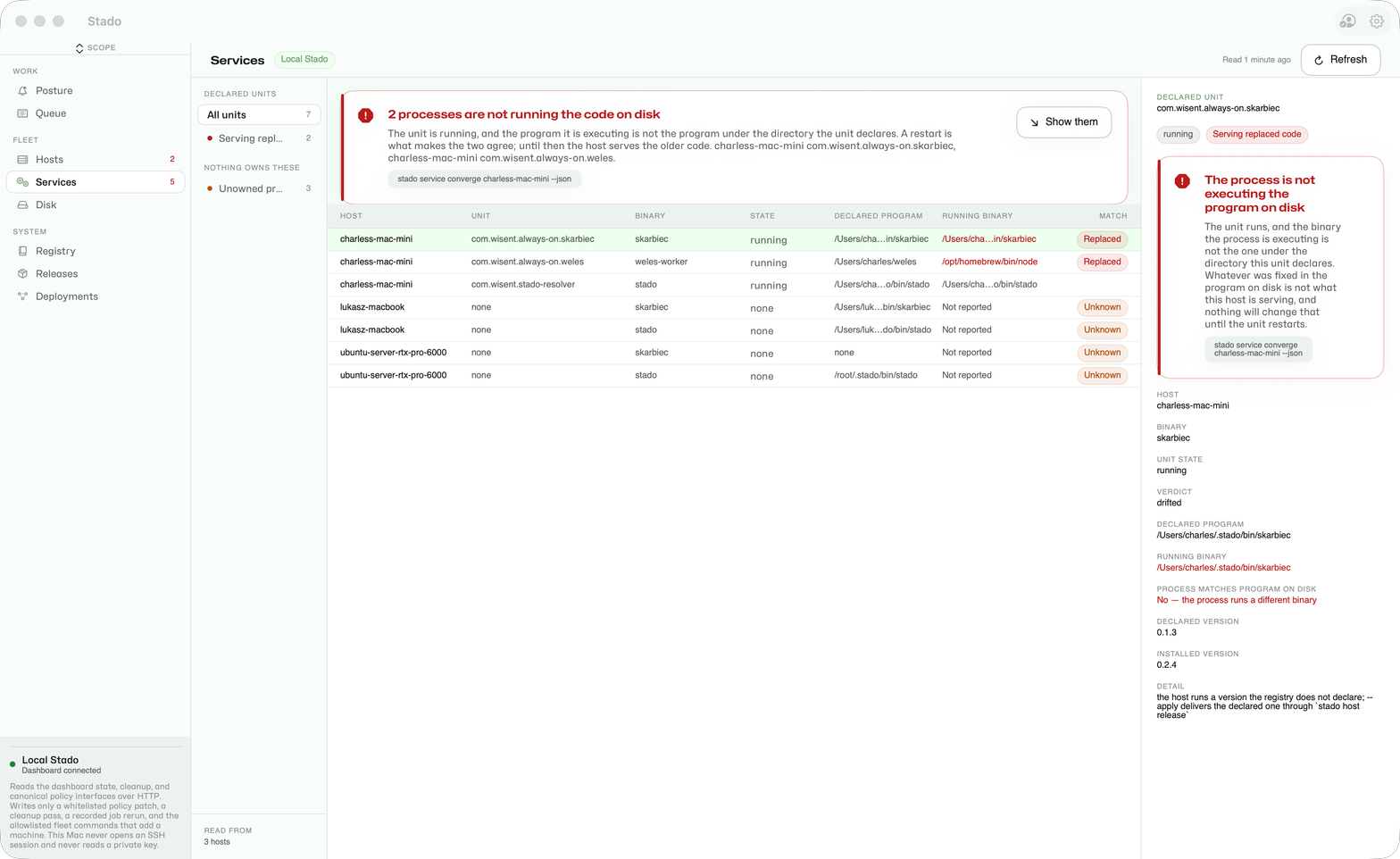
Once a machine reports, three screens answer the questions that used to need an SSH session. Each one runs the stado commands documented in the CLI reference and shows their answers; build the app with swift build --package-path desktop/StadoDesktop. The screenshots are live reads of the Wisent fleet.
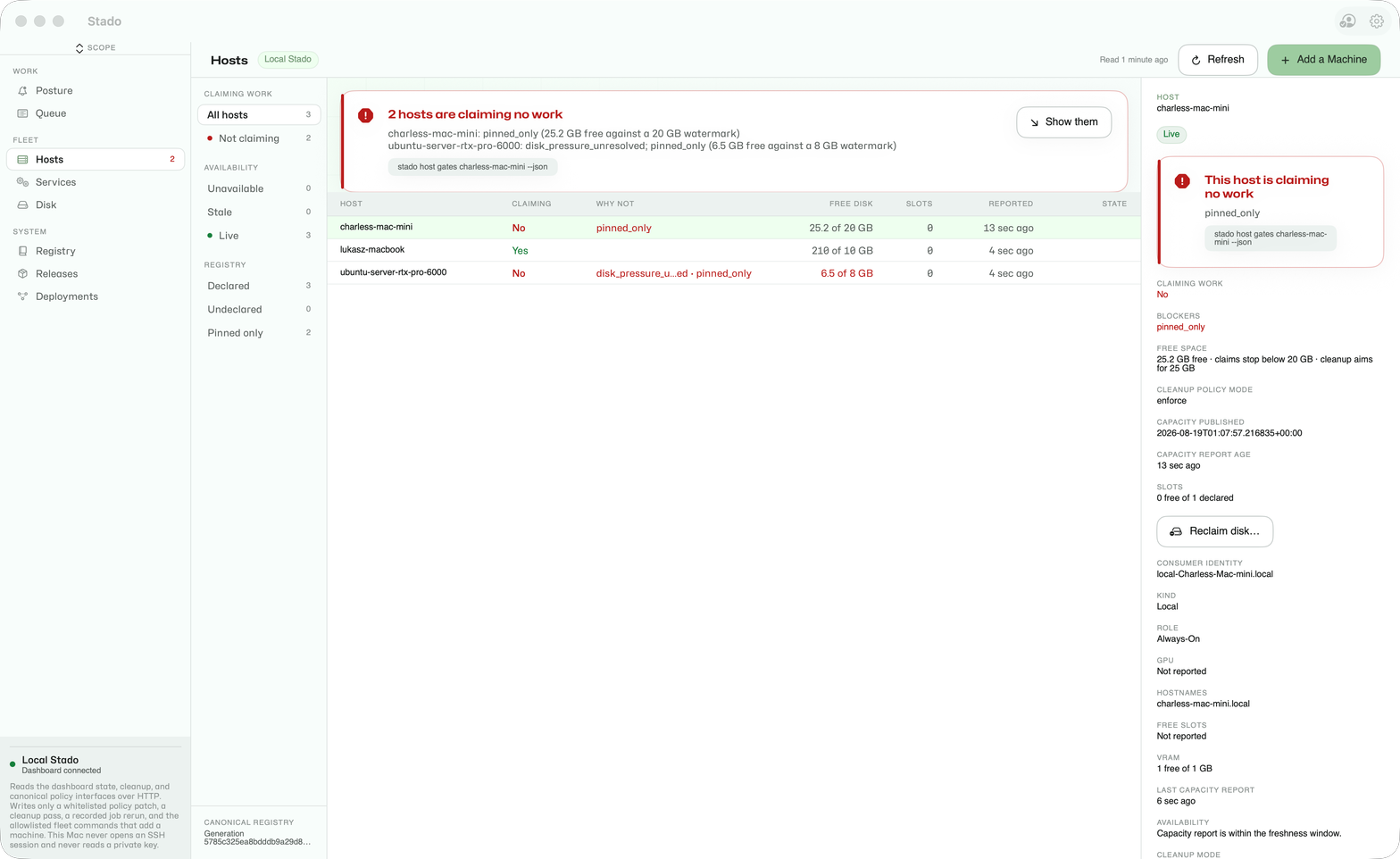
Hosts — read why a host is claiming no work: the blockers its own agent publishes, its free space against the enforced watermark and the age of its capacity report (stado host gates), and preview-first disk reclamation (stado host reclaim).

Services — read what the host is actually running against what it declares, including the binary each process is really executing (stado service converge), and the product processes no unit owns (stado service list --unowned).
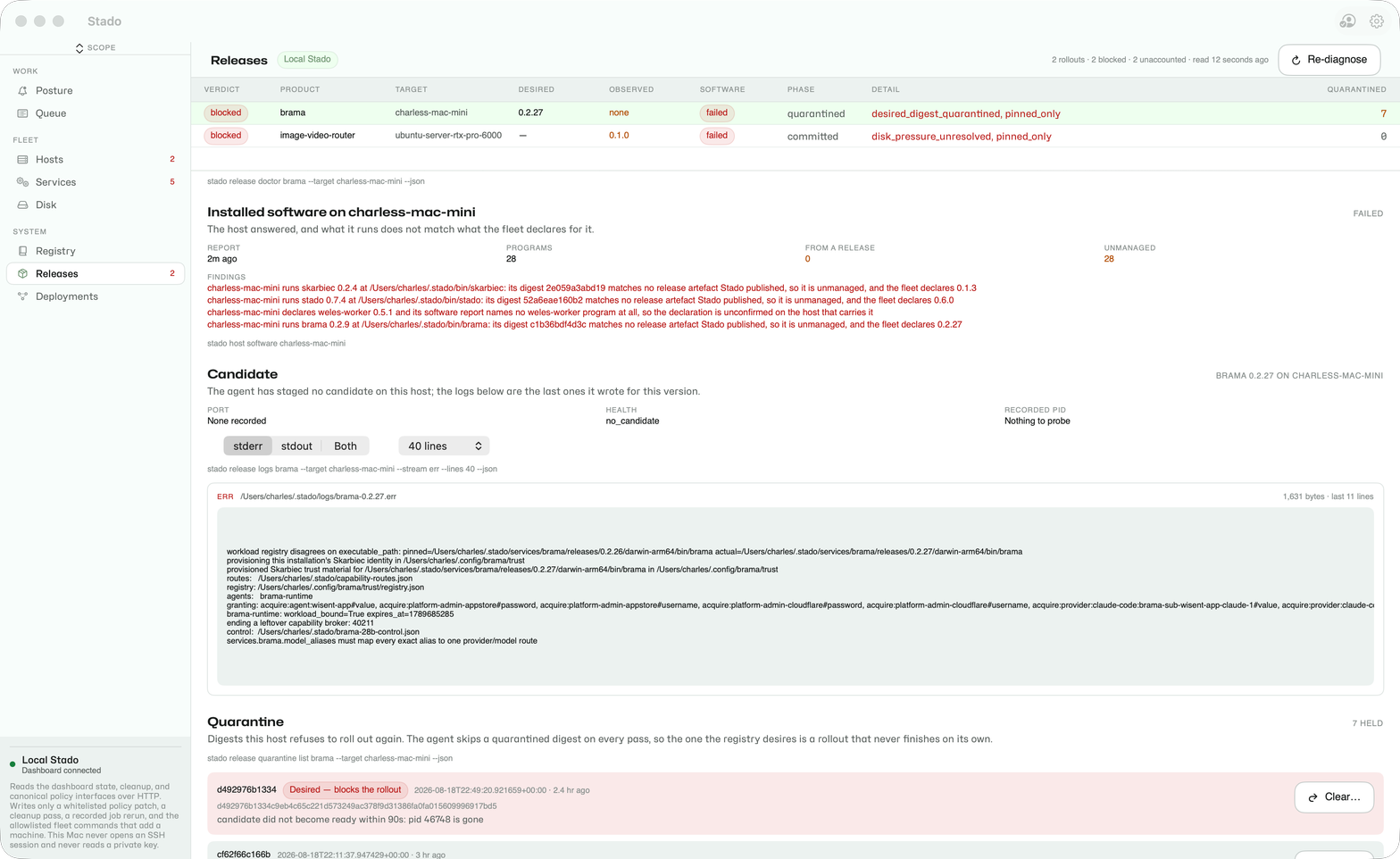
Releases — read why a rollout is stuck: the verdict and blockers (stado release doctor), the candidate's own stderr off the host (stado release logs), and the quarantined digests with the desired one first, which is where a digest is cleared with a typed reason (stado release quarantine list|clear).
Failure guidance
config file already exists: validate or migrate it; do not overwrite it implicitly.ERROR config schema_version ...: runstado config migrateonly for a trusted legacy config. Future schema versions require a compatible Stado release.- storage unreachable: stop submission, preserve the source, and follow
stado storage backup,stado storage verify, or the outage recovery procedure. Unreachable storage is never treated as an empty queue. - job remains queued: confirm an eligible worker is running, the queue is not paused, capacity fits, and the workload deadline has not expired.
- worker rejects or fails a job: install the requested shell/runtime/driver on that worker or change the workload. Stado does not silently supply workload dependencies.
- API authorization error: each route family (object, release, machine, service, host-health) resolves its own scoped bearer; check the grant for the route being called. Do not bypass or disable the authorization boundary.
- immutable release collision or digest failure: stop. Publish a new version; never overwrite the existing coordinate.
Uninstall and local reset
The uninstall script requires an explicit confirmation value and preserves config and queue data by default:
STADO_UNINSTALL_CONFIRM=uninstall-stado ./uninstall-stado.sh
It disables Stado launchd/systemd-user services, removes installed Stado binaries, and leaves $HOME/.stado/config.json, local storage, and local backup intact.
To remove those local data stores and config as well:
STADO_UNINSTALL_CONFIRM=uninstall-stado ./uninstall-stado.sh --purge-data
--purge-data is irreversible. Before using it, stop all writers and copy any queue, results, artifacts, or configuration that must survive. It does not delete cloud objects or credentials outside the local Stado paths.
Source: this website